★ For Fractional CFOs, Accounting Firms, VCs and Venture Studios
Every Company You Look After.
One Sign‑In.
Add each company you advise, own or back to your own sign-in. Each one keeps its own books, budget and team, and you move between them from the account menu.
Book a time, and we will walk through your companies with you.
One Sign-In for Every Company
When you add a company, you say what it is to you. That decides where it is listed and who holds it.
Fractional CFOs & Accounting Firms
Companies You Advise
- ✓ Add a client’s company under your own sign-in. It is listed under Clients I advise.
- ✓ Set it up yourself, or invite the client’s owner. When they accept, they become the Owner and you stay on as an External Admin.
- ✓ Each client keeps its own books, its own budget and its own team.
VCs, Venture Studios & Holding Companies
Companies You Own or Back
- ✓ Add a portfolio company, a second business or a holding company as part of your organization. It is listed under My companies.
- ✓ You hold it as its Owner, and you can invite an Owner later and step down to Admin.
- ✓ Run your own firm on it too. Track your business units as classes and see your budget by class.
The Questions You’ll Ask First
“How does the data get in, and how fresh is it?”
Each company connects its own QuickBooks Online or Puzzle account. Its books sync every night, and Re-sync Actuals on the Budget page pulls in the latest when you need it, up to three times in 24 hours.
“Every company’s budget is in a different format. How do I load one, and what about a mid-year re-forecast?”
With our template, in Excel or CSV: export it, fill in the company’s numbers and import them. If a budget is in another layout, copy its numbers into the template first. To re-forecast, import the revised numbers the same way, or change the company’s plan in Planning (Beta) and republish it.
“How do I see budget against actuals each month, and report the variances?”
The Budget page lays a company’s budget out month by month beside its actuals, with the variance. Export it to Excel for your own report: budget, actual and variance for every month, on one sheet. Or ask Merlin how the budget compares with the actuals.
“Where does modeling fit in, and can I see the net change it makes?”
An initiative is a what-if: a hire, a cost cut, a new revenue line. Its cards compare the baseline with the initiative for cash balance, runway, net income and average monthly revenue. Once you decide, add it to the budget, or to a plan in Planning (Beta).
“We run business units as classes. Can I see the budget by class?”
Not only can you track budgets by Classes, but you can also Plan & model Initiatives by Class as well. If it’s tagged in your accounting system, you’ll see it reflected here too.
“Can I switch easily between a portfolio company and our own?”
Yes. Open the account menu and choose Switch companies. Your companies are grouped under My companies and Clients I advise, with a filter once you have more than eight, and you pick the one to open. Works on mobile too.
Add a Company in a Few Steps
Add
From the account menu, add a company. Name it, and say whether it is a client you advise or part of your organization.
Connect
A short setup walks you through the company’s details, connecting its QuickBooks Online or Puzzle account, adding a payment method, and inviting people.
Keep or Hand Off
Keep the company, or invite its owner. When they accept, they become the Owner and you stay on: as an External Admin on a client’s company, as an Admin on your own.
What You See in Each Company
Open a company and you work in it the way its own team does: dashboard, budget, initiatives and Merlin.
Each Company’s Profit and Loss
The Budget page lays out a company’s profit and loss month by month, starting with its actuals from the books. Filter it by initiative, class or vendor.
See Budgeting →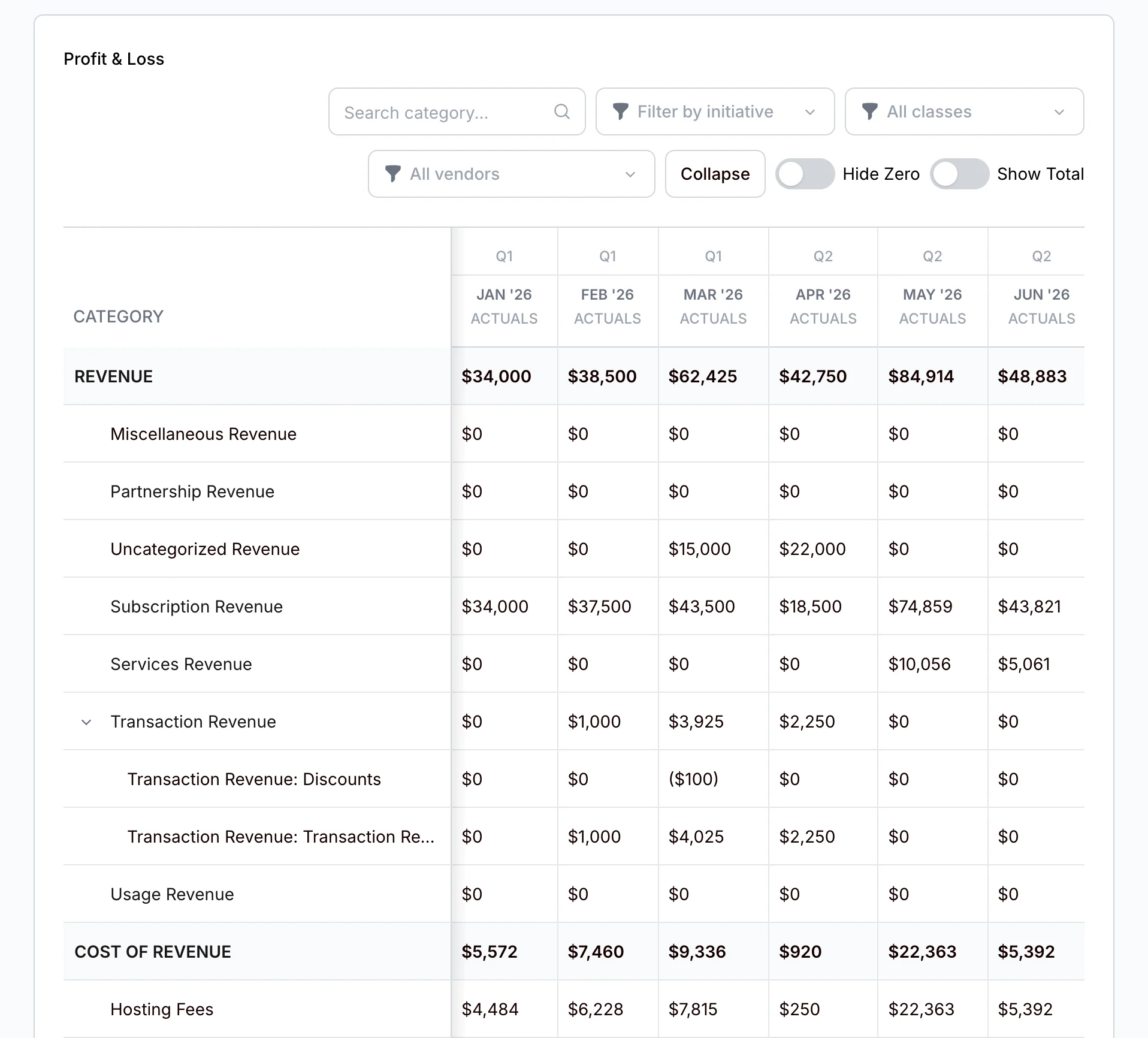
What an Initiative Changes
Each card compares the baseline with the initiative, so you see the change before anyone commits to it.
See Scenario Planning →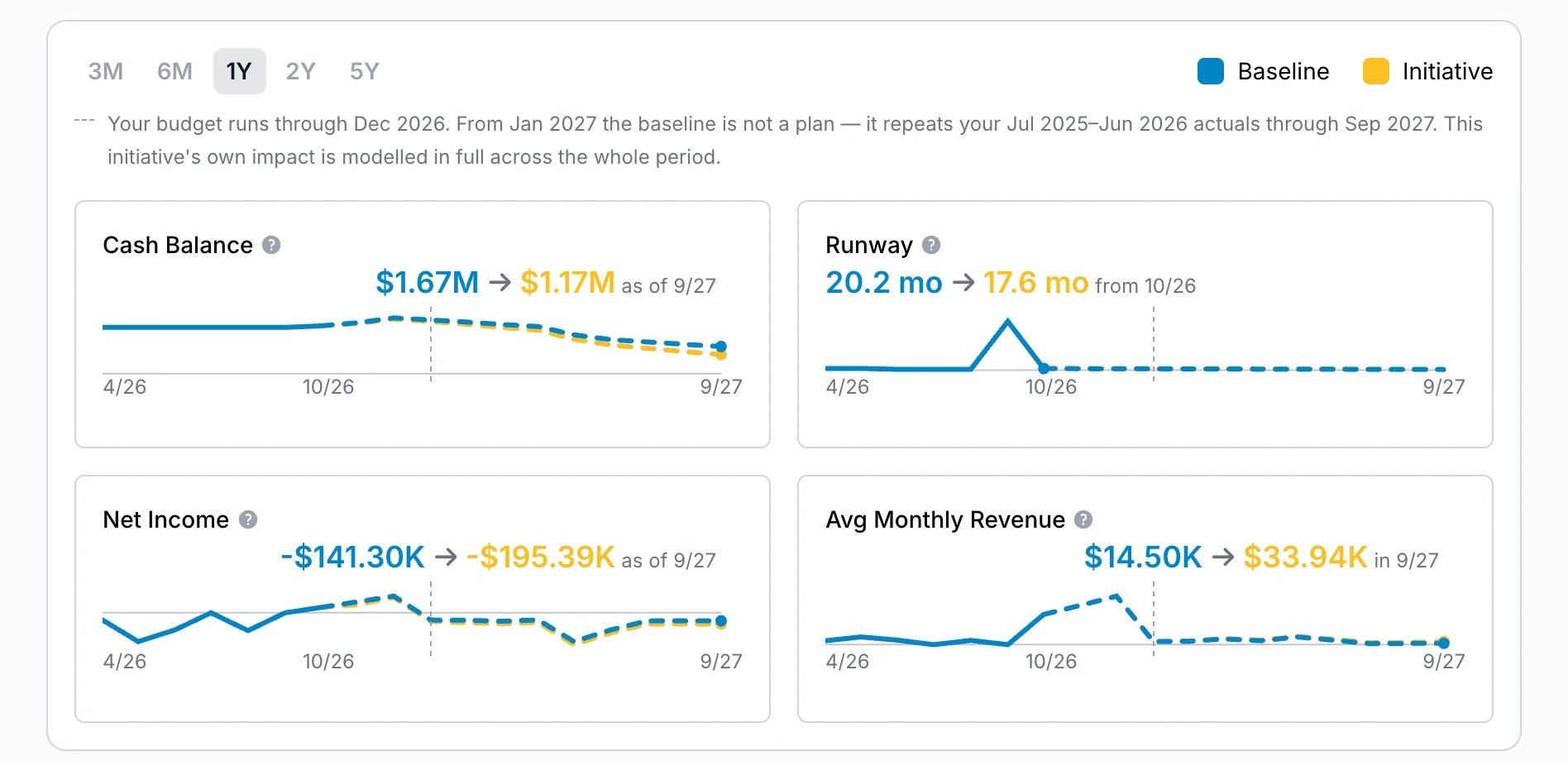
The Budget by Class
Where available: if a company’s books track classes, such as business units, pick one and the Budget page shows that class.
See Budgeting →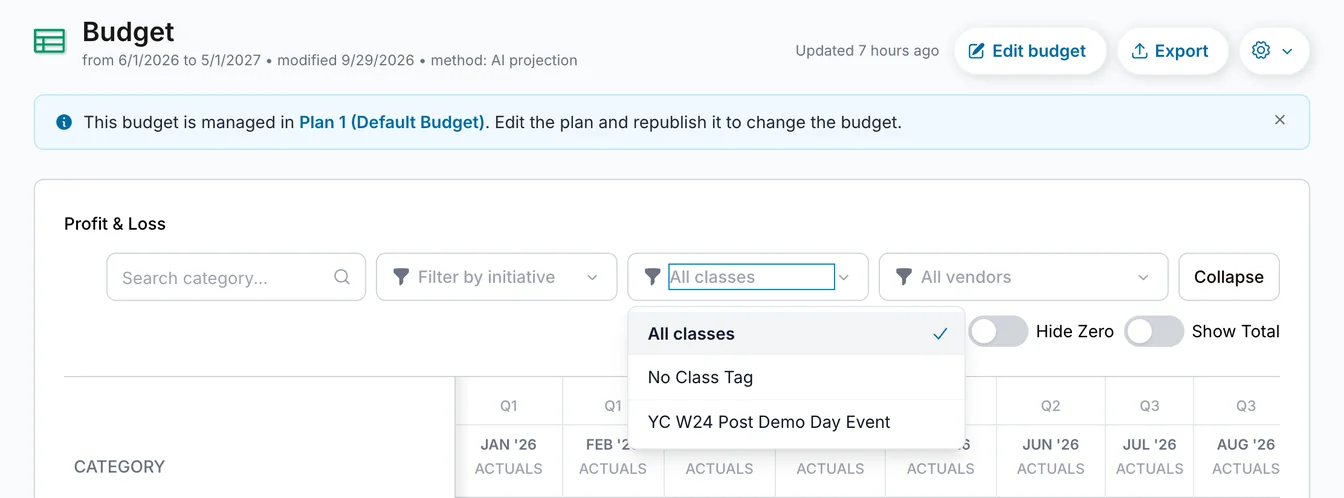
Questions From Advisors and Investors
Who is MyRunwayHealth for, if I look after more than one company? +
Do I need a separate sign-in for each company? +
Does each company keep its own data? +
Can I hand a company over to its owner? +
How fresh is each company’s data? +
Can I take the numbers into my own tools? +
How do we get started? +
Powered by Merlin AI
In each company, ask Merlin about its books and its budget in plain English, including how the budget compares with the actuals.
Meet Merlin →Looking After More Than One Company?
Tell us about your companies and how you work, and we will show you how it fits.
Talk to Us